
WiFi marketing for vacation rentals

Every guest who connects to your rental WiFi is a contact Airbnb will never give you.

Travelers expect WiFi the moment they walk in. Easy Smart WiFi turns that check-in login into an opted-in email and SMS list you own — then runs direct rebook offers, local ad placements, party alerts, and checkout review requests for the full length of the stay.

  • 30-day free trial
  • No setup cost
  • Cancel anytime

What is WiFi marketing for vacation rentals?

WiFi marketing for vacation rentals is a system that turns a short-term rental property's guest network into a marketing list the host controls. When a traveler arrives and connects, they log in through a branded splash page with email, phone number, or a social account. That opted-in contact detail is stored in the host's own database along with the stay dates and device activity. The host can then send automated emails and text messages — direct rebooking offers, referral codes, house information, local partner promotions, occupancy alerts, and platform review requests — without relying on Airbnb or Vrbo to share guest information.

What it replaces

Printed welcome binders guests ignore, checkout emails buried in OTA threads, QR codes taped to the fridge, and property management software that tracks bookings but not who is actually on the WiFi.

What it needs

The guest WiFi you already provide. A plug-and-play unit connects to your existing router, or the platform integrates with hardware you already own — 1,500+ integrations .

Who owns the data

You do — not the booking platform. The list is exportable and moves with you if you change property managers or marketing tools.

7× more emails

Head to head against a traditional loyalty tablet, Easy Smart WiFi collected 7 emails for every 1 the tablet captured — with no staff interaction at all. (Restaurant benchmark; same capture mechanic applies at property check-in.)

From $50/mo

Per location, with a 30-day free trial, no setup cost, and cancel anytime. One direct rebooking often covers months of the platform.

No form. No sales call.

See a real splash page

Branded vacation rental WiFi splash page on a phone showing property marketing, guest login fields, and house information

Open a live Easy Smart WiFi login screen on your phone to see exactly what arriving guests would see at your property.

Open live example
Ways hosts use it

Four moments across a multi-day stay where your WiFi can work for you.

A vacation rental guest connects once and stays on your network for days. These touchpoints run on their own for the length of the booking.

01 At check-in

Capture the contact detail OTAs withhold

Airbnb and Vrbo control the guest relationship after checkout. The one compliant path to a direct list is capture at the property — and every traveler accepts WiFi login on arrival.

  • Branded splash page with your property name and logo
  • House rules, check-out time, and parking instructions on the login screen
  • Email, SMS, or social login — guest chooses, you get an opted-in contact
  • Works whether the booking came through an OTA or your direct site

This is the only moment every guest in the party will look at a screen with your branding on it.
02 During the stay

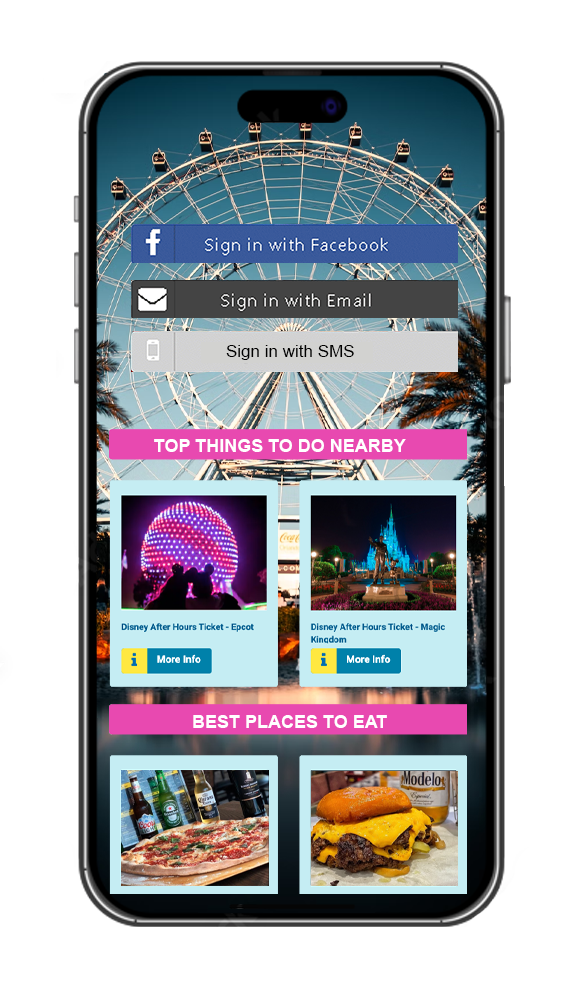
Monetize the splash page with local partner ads

Your login screen is ad space you control for the full length of a three-, seven-, or fourteen-night stay. Nearby restaurants, tour operators, kayak rentals, and attractions can pay to appear where every guest looks while connecting phones, tablets, and streaming devices.

  • Rotate placements without redesigning the page
  • Post-login messages to guests already on the network
  • Revenue from local businesses offsets your WiFi marketing cost
Vacation rental WiFi landing page displaying local business promotions for nearby restaurants, tours, and attractions
03 While guests are on site

See how many devices are actually on the property

A listing capped at six guests can silently host far more phones on a Saturday night. The occupancy dashboard shows device counts, login frequency, and peak connection times during the stay.

  • Alerts when device count exceeds the booked guest limit
  • Early warning before noise complaints or property damage escalate
  • Useful for remote hosts who cannot physically monitor the property daily

Full detail on party detection and occupancy alerts further down this page .

04 After checkout

Automations keep working when the guest has left

Set the rules once. They run for every booking without anyone remembering to send a message:

  • Platform review requests — sent at checkout while the stay is still fresh
  • Direct rebook offers — a returning-guest discount or booking link that bypasses OTA fees
  • Referral codes — guests share your property with friends who book direct
  • Seasonal availability blasts — fill shoulder-season weeks from your own list
  • Thank-you messages — with a link to your direct booking site for next year
Direct rebooking

How do vacation rental hosts use WiFi for repeat bookings without a loyalty punch card?

Short-term rental guests do not come back weekly like restaurant regulars. They stay once, often for a week, and leave. The value is not visit three of ten — it is capturing their contact at check-in and reaching them after checkout with a reason to book direct next time.

  • No repeat-visit mechanic required. One stay, one capture, one post-checkout sequence.
  • Stay date stored with the contact. You know when they visited and can time rebook offers for the same season next year.
  • Referral codes for friends. A guest who loved the property forwards a link you control — not an OTA listing.
  • Commission savings on direct bookings. Even one repeat direct stay often covers months of platform cost.
Example: direct rebook offer at checkout
  1. 1 Check-in
    Guest joins property WiFi. Email captured with stay dates.
  2. 2 Mid-stay
    House tips and local recommendations sent automatically.
  3. 3 Checkout
    Review request and direct rebook link trigger on departure day.
Email · sent automatically
Thanks for staying with us, Sarah! Book direct next summer and save 10% with code WELCOME-BACK — your dates are still open in June.
Reviews & ratings

How can a vacation rental host get more Airbnb and Vrbo reviews?

For short-term rentals, platform star ratings are not a nice-to-have — they drive calendar fills. A host with strong reviews still loses bookings when the rating slips, yet most properties have no systematic way to ask every guest at checkout.

Because every guest who connects to your WiFi leaves a contact detail behind, you can ask all of them — automatically, on checkout day, when the stay is still fresh.

  • Ask everyone who connected, not just the booker. A printed card in the kitchen reaches whoever finds it. An automated message reaches every opted-in guest from the stay.
  • Timing you control. Send on checkout morning, the evening after departure, or whenever fits your turnover schedule.
  • Every guest gets the same invitation. Requests go to your whole list, which is what platform policies require — and it produces a rating people trust.
  • Private feedback has a route too. Guests who want to raise something directly can reach you for service recovery — but everyone still gets the same public review invitation.

Why the rating matters beyond the rating

Airbnb and Vrbo search algorithms weigh review count, recency, and star score when ranking listings. Hosts who consistently ask every guest tend to build both a stronger rating and better visibility in platform search results.


The compounding effect:

  1. More guests connect at check-in and join your list
  2. More guests receive a checkout review request
  3. Platform review count and star rating climb
  4. Listing visibility in OTA search improves
  5. More bookings fill the calendar — and connect at arrival

Ranking depends on many factors and no platform can guarantee a position. What you can control is how many guests you actually ask.

Campaign ideas

Campaigns vacation rental hosts run with this

Set them once. Edit them whenever. They run on their own for every booking.

Checkout review request

Sent automatically on departure day to every guest who connected during the stay — while the property is still top of mind.

Direct rebook discount

A returning-guest code sent after checkout, linked to your own booking site instead of an OTA listing.

Refer-a-friend

Guest forwards a referral link to friends planning a trip to your area. You capture the booking direct.

Shoulder-season fill

Blast past guests when you have open weeks in the slow season — people who already know the property.

House manual by text

Trash day, thermostat settings, and pool rules sent automatically on day one instead of buried in a PDF folder.

Local partner spotlight

Promote a paid placement from a nearby restaurant or tour operator to guests still on the network mid-stay.

Party threshold alert

Notify the host when device count exceeds the booked guest limit — before neighbors call.

Annual return reminder

Timed for the same week they stayed last year, with a link to check open dates on your direct site.

New property launch

Announce a second listing to guests who already stayed at your first property and trusted the experience.

Setup

Four steps. The first takes about a minute.

01

Plug in or integrate

The Smart WiFi unit goes into your property router. Power on, connect, test. No new internet line — or integrate with the network hardware you already own.

See integrations
02

Build your splash page

Drag and drop your property logo, house rules, local partner ads, and the login options you want — email, SMS, or social.

03

Guests connect at check-in

No password on the fridge magnet. Details go straight into your database, opted in and compliant, then guests are redirected wherever you choose.

04

Automations take over

Review requests, rebook offers, referral codes, and occupancy alerts run on the rules you set for every booking.

Also used by restaurants and other hospitality businesses listed on our industries hub.

Vacation rental WiFi marketing FAQ

Can WiFi marketing help vacation rental hosts get guest contact info Airbnb won't share?

Yes. Airbnb, Vrbo, and similar booking platforms control the guest relationship and do not hand hosts a marketing-ready email or phone list. Easy Smart WiFi captures opted-in contact details at check-in when guests connect to your property network through a branded splash page. That list belongs to the host, not the OTA, so you can remarket for direct rebookings and referrals after checkout.

How do vacation rental hosts use WiFi to encourage direct rebookings?

After a guest opts in at login, Easy Smart WiFi stores their contact detail with the stay date. Automated emails or texts can go out at checkout with a direct-booking link, a returning-guest discount, or a referral code for friends. Because OTAs take a commission on each booking, even one repeat direct stay often covers months of the platform cost.

Can Smart WiFi detect unauthorized parties at my rental?

The occupancy dashboard shows how many devices connected during a stay, login frequency, and peak connection times. If your listing allows five guests but thirty phones join the network on a Friday night, that pattern is visible immediately. Hosts can set alerts when device counts exceed the booked guest limit, giving early warning before noise complaints or property damage escalate.

How do hosts make money from local business ads on the splash page?

The WiFi login screen is ad space you control. Nearby restaurants, tour operators, rental shops, and attractions can pay to appear on the splash page or in post-login messages seen by every guest during a multi-day stay. Easy Smart WiFi lets hosts rotate those placements without redesigning the page, turning guest WiFi into a local advertising channel.

Does WiFi marketing work for Airbnb and Vrbo properties?

Yes. The property needs guest WiFi and a router or access point compatible with Easy Smart WiFi. Whether guests book through Airbnb, Vrbo, Booking.com, or direct, they still connect to your network at arrival. The splash page works the same way: capture contact details, show house information, and trigger automations for the length of the stay.

Will guest WiFi slow down streaming for my vacation rental guests?

No. Bandwidth management gives priority to normal guest usage while throttling heavy abuse that could affect neighbors or your equipment. Vacation rental guests expect to stream, video call, and work remotely. The system is designed so marketing capture runs on login without turning your property WiFi into a bottleneck during the stay.

Is collecting guest emails and phone numbers legal for short-term rentals?

Yes, when guests consent on the splash page. Easy Smart WiFi login screens include explicit opt-in language for terms of service, TCPA for SMS, and CAN-SPAM for email. Hosts build a compliant list they own outright, which is the lawful alternative to scraping OTA messaging or buying third-party guest lists.

Who owns the guest data collected through rental WiFi?

The host owns the data, not the booking platform. Contact details export from Easy Smart WiFi and move with you if you change property managers or marketing tools. That ownership is the core difference between building a direct guest list and relying entirely on Airbnb or Vrbo, where the platform keeps the relationship after checkout.

Your property WiFi is full of guests you cannot reach after checkout — yet.

Thirty days free. No setup cost. Cancel anytime. Starting at $50/mo per location.

© 2024 WiFiMarketing.tech / Easy Smart Wifi

All trademarks, logos and brand names are the property of their respective owners. All company, product and service names used in this website are for identification purposes only. Use of these names, trademarks and brands does not imply endorsement.


Skip to content